import numpy as np
import matplotlib.pyplot as plt
import tensorflow as tf
from tensorflow import keras
from tensorflow.keras.models import Model
from tensorflow.keras.layers import Input, GlobalAveragePooling2D, Dense
from tensorflow.keras.applications import ResNet50
from sklearn.metrics import accuracy_score, confusion_matrixResNet Classification of the CIFAR-10 Dataset
This notebook demonstrates how to use a Residual Network (ResNet) to classify images from the CIFAR-10 dataset. ResNets use skip (shortcut) connections that allow gradients to flow through the network more easily, enabling the training of much deeper networks.
The CIFAR-10 dataset contains 60,000 color images across 10 classes, each with a size of 32x32 pixels.
Dataset split: - Training set: 50,000 images - Test set: 10,000 images
Target variable: Object class (airplane, automobile, bird, cat, deer, dog, frog, horse, ship, truck)
Import Modules
Load the CIFAR-10 Dataset
# Load the dataset from keras datasets
(X_train, y_train), (X_test, y_test) = keras.datasets.cifar10.load_data()
# Display the shape of training and test data
print(X_train.shape)
print(X_test.shape)
# Each image has 32x32 pixels with 3 color channels (RGB)(50000, 32, 32, 3)
(10000, 32, 32, 3)# Class names for CIFAR-10
class_names = ['airplane', 'automobile', 'bird', 'cat', 'deer', 'dog', 'frog', 'horse', 'ship', 'truck']
# Display 9 images from the training set and their labels
plt.figure(figsize=(9, 6))
for n in range(9):
i = np.random.randint(0, len(X_train), 1)
ax = plt.subplot(3, 3, n+1)
plt.imshow(X_train[i[0]])
plt.title('Label: ' + class_names[y_train[i[0]][0]])
plt.axis('off')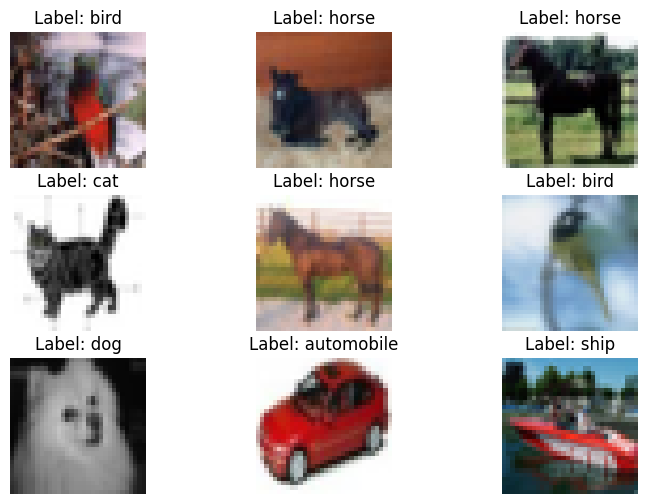
Data Preprocessing
# Normalize pixel values to range [0, 1]
X_train = X_train.astype('float32') / 255.0
X_test = X_test.astype('float32') / 255.0
# Print the shapes of data and label sets
print('Training data features', X_train.shape)
print('Training labels', y_train.shape)
print('Testing data features', X_test.shape)
print('Testing labels', y_test.shape)Training data features (50000, 32, 32, 3)
Training labels (50000, 1)
Testing data features (10000, 32, 32, 3)
Testing labels (10000, 1)Load the ResNet Model
# Load a pretrained ResNet50 model (without the top classification layer)
base_model = ResNet50(weights='imagenet', include_top=False, input_shape=(32, 32, 3))
# Add custom classification head on top of the pretrained ResNet
inputs = Input(shape=(32, 32, 3))
x = base_model(inputs, training=False)
x = GlobalAveragePooling2D()(x)
# Output layer - 10 classes
outputs = Dense(units=10, activation='softmax')(x)# Define the model by providing the inputs and outputs
model = Model(inputs, outputs)Train the ResNet Model
# Compile the model
model.compile(optimizer='adam', loss='sparse_categorical_crossentropy', metrics=['accuracy'])
# Fit the model to the training dataset
history = model.fit(X_train, y_train, epochs=20, batch_size=128, validation_split=0.2, verbose=1)Epoch 1/20 313/313 ━━━━━━━━━━━━━━━━━━━━ 89s 127ms/step - accuracy: 0.5290 - loss: 1.5985 - val_accuracy: 0.0952 - val_loss: 2.6101 Epoch 2/20 313/313 ━━━━━━━━━━━━━━━━━━━━ 16s 50ms/step - accuracy: 0.6891 - loss: 1.0139 - val_accuracy: 0.2173 - val_loss: 2.7117 Epoch 3/20 313/313 ━━━━━━━━━━━━━━━━━━━━ 16s 50ms/step - accuracy: 0.6840 - loss: 0.9770 - val_accuracy: 0.5353 - val_loss: 1.4401 Epoch 4/20 313/313 ━━━━━━━━━━━━━━━━━━━━ 15s 48ms/step - accuracy: 0.7451 - loss: 0.7635 - val_accuracy: 0.7171 - val_loss: 0.8835 Epoch 5/20 313/313 ━━━━━━━━━━━━━━━━━━━━ 15s 48ms/step - accuracy: 0.8225 - loss: 0.5278 - val_accuracy: 0.5228 - val_loss: 1.7669 Epoch 6/20 313/313 ━━━━━━━━━━━━━━━━━━━━ 15s 48ms/step - accuracy: 0.7955 - loss: 0.6012 - val_accuracy: 0.7394 - val_loss: 0.8048 Epoch 7/20 313/313 ━━━━━━━━━━━━━━━━━━━━ 15s 48ms/step - accuracy: 0.8636 - loss: 0.4018 - val_accuracy: 0.5069 - val_loss: 1.6465 Epoch 8/20 313/313 ━━━━━━━━━━━━━━━━━━━━ 15s 49ms/step - accuracy: 0.6810 - loss: 1.0346 - val_accuracy: 0.6632 - val_loss: 1.0350 Epoch 9/20 313/313 ━━━━━━━━━━━━━━━━━━━━ 15s 49ms/step - accuracy: 0.6969 - loss: 0.9305 - val_accuracy: 0.5403 - val_loss: 1.4022 Epoch 10/20 313/313 ━━━━━━━━━━━━━━━━━━━━ 15s 48ms/step - accuracy: 0.7444 - loss: 0.7678 - val_accuracy: 0.6198 - val_loss: 1.2312 Epoch 11/20 313/313 ━━━━━━━━━━━━━━━━━━━━ 15s 48ms/step - accuracy: 0.7858 - loss: 0.6437 - val_accuracy: 0.7285 - val_loss: 0.8118 Epoch 12/20 313/313 ━━━━━━━━━━━━━━━━━━━━ 15s 48ms/step - accuracy: 0.8737 - loss: 0.3781 - val_accuracy: 0.7305 - val_loss: 0.9455 Epoch 13/20 313/313 ━━━━━━━━━━━━━━━━━━━━ 15s 48ms/step - accuracy: 0.8759 - loss: 0.3676 - val_accuracy: 0.7556 - val_loss: 0.8160 Epoch 14/20 313/313 ━━━━━━━━━━━━━━━━━━━━ 15s 49ms/step - accuracy: 0.9155 - loss: 0.2537 - val_accuracy: 0.7680 - val_loss: 0.8328 Epoch 15/20 313/313 ━━━━━━━━━━━━━━━━━━━━ 15s 49ms/step - accuracy: 0.9317 - loss: 0.1983 - val_accuracy: 0.7390 - val_loss: 1.0410 Epoch 16/20 313/313 ━━━━━━━━━━━━━━━━━━━━ 15s 49ms/step - accuracy: 0.9367 - loss: 0.1952 - val_accuracy: 0.7147 - val_loss: 1.0870 Epoch 17/20 313/313 ━━━━━━━━━━━━━━━━━━━━ 15s 48ms/step - accuracy: 0.9279 - loss: 0.2208 - val_accuracy: 0.7608 - val_loss: 0.8942 Epoch 18/20 313/313 ━━━━━━━━━━━━━━━━━━━━ 15s 48ms/step - accuracy: 0.9515 - loss: 0.1390 - val_accuracy: 0.7599 - val_loss: 0.9612 Epoch 19/20 313/313 ━━━━━━━━━━━━━━━━━━━━ 15s 48ms/step - accuracy: 0.9620 - loss: 0.1102 - val_accuracy: 0.7419 - val_loss: 1.1757 Epoch 20/20 313/313 ━━━━━━━━━━━━━━━━━━━━ 15s 48ms/step - accuracy: 0.9715 - loss: 0.0848 - val_accuracy: 0.7651 - val_loss: 1.0730
# Plot the accuracy and loss
train_loss = history.history['loss']
val_loss = history.history['val_loss']
acc = history.history['accuracy']
val_acc = history.history['val_accuracy']

epochsn = np.arange(1, len(train_loss)+1, 1)
plt.figure(figsize=(12, 4))

plt.subplot(1, 2, 1)
plt.plot(epochsn, acc, 'b', label='Training Accuracy')
plt.plot(epochsn, val_acc, 'r', label='Validation Accuracy')
plt.grid(color='gray', linestyle='--')
plt.legend()
plt.title('ACCURACY')
plt.xlabel('Epochs')
plt.ylabel('Accuracy')

plt.subplot(1, 2, 2)
plt.plot(epochsn, train_loss, 'b', label='Training Loss')
plt.plot(epochsn, val_loss, 'r', label='Validation Loss')
plt.grid(color='gray', linestyle='--')
plt.legend()
plt.title('LOSS')
plt.xlabel('Epochs')
plt.ylabel('Loss')
plt.show()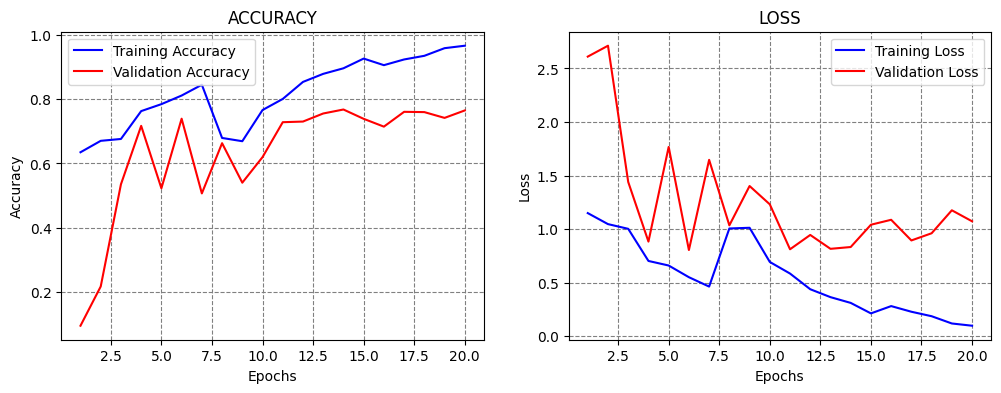
Evaluate the Model
# Calculate and print the accuracy on the test dataset
evals_test = model.evaluate(X_test, y_test)
print(f"Accuracy on test dataset: {evals_test[1]*100:5.2f}%")
313/313 ━━━━━━━━━━━━━━━━━━━━ 5s 7ms/step - accuracy: 0.7598 - loss: 1.1098 Accuracy on test dataset: 75.57%
# Predict on test dataset
y_pred_probabilities = model.predict(X_test)
model_predictions = np.argmax(y_pred_probabilities, axis=1)
313/313 ━━━━━━━━━━━━━━━━━━━━ 9s 18ms/step
# Print confusion matrix
print("Confusion Matrix:")
print(confusion_matrix(y_test, model_predictions))
Confusion Matrix:
[[858 4 36 21 17 3 5 5 19 32]
[ 36 749 5 12 0 4 7 0 22 165]
[ 57 2 674 91 61 51 17 32 3 12]
[ 26 4 35 729 29 111 18 29 2 17]
[ 25 1 69 123 672 20 26 56 3 5]
[ 11 2 41 245 21 607 12 47 4 10]
[ 9 4 58 111 10 26 770 5 0 7]
[ 13 2 18 59 33 30 3 820 3 19]
[126 8 13 26 6 2 7 0 789 23]
[ 42 17 4 11 0 4 3 9 21 889]]The confusion matrix shows the classification results for each object class (airplane, automobile, bird, cat, deer, dog, frog, horse, ship, truck): - Diagonal elements: Correctly classified images - Off-diagonal elements: Misclassifications (showing which classes were confused with each other)